Prepare the Sources
Select the correct website in your account. For product recommendations, first upload the catalogue and check prices, variants and availability in catalogue fields. Put delivery, payment, warranty and service terms in the knowledge base. Install the widget using the embedding instructions. Renaming the assistant cannot fix a missing product or an empty document.
The backend retrieves products and relevant materials before generating an answer. An unknown attribute means neither yes nor no. For example, missing frost-resistance data cannot justify confidently recommending a tile for outdoor use. Requirements must hold for the same offer: the assistant must not combine the colour of one variant, availability of another and price of a third.
Choose a Conversation Mode
Open Consultant → Conversation (/lk/consultant). The Mode section provides three choices.
| Mode | Suitable use | What to test |
|---|---|---|
Sales (sales) |
Catalogue recommendations, purchases and leads | Relevant products and clarification of constraints |
Support (support) |
Documentation, knowledge base and contact handoff | Policy-based answers without invented order statuses |
Services (services) |
Understanding a project, similar work, estimates or meetings | Services are not presented as stock items |
A mode sets the conversation's focus; it does not connect external systems. Services requires descriptions of work and projects, while Support requires current instructions. Order status needs a separate store handler, not merely a mode selection.
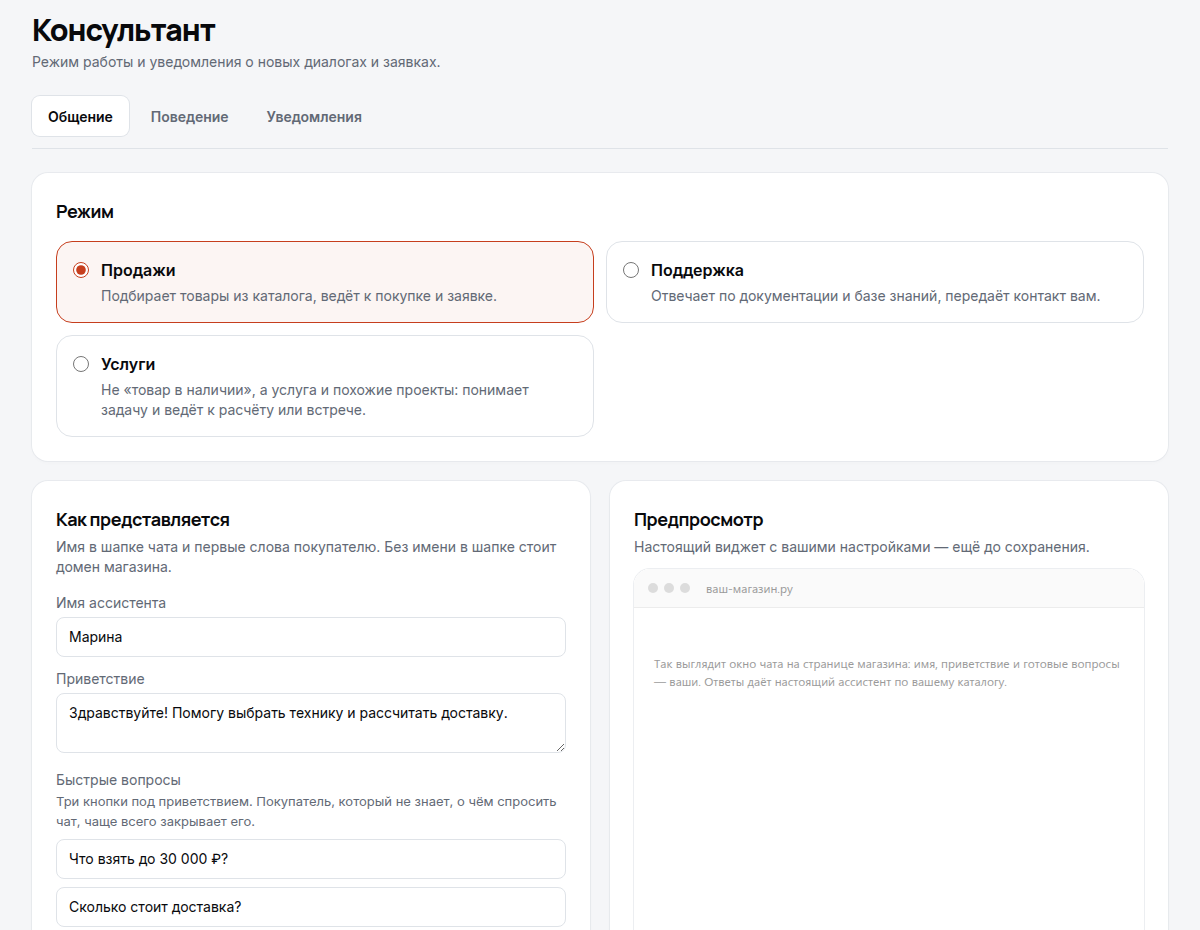
Demo: a cropped view of the real account interface in Russian. Use it to locate conversation settings; the name and questions are examples, not ready-made policies for your store.
Set the Assistant's Introduction
- Enter the Assistant name, up to 60 characters. With no name, the chat header shows the store domain.
- Write a Greeting, up to 500 characters. Explain a useful task, for example: “I can help choose tiles for your room and budget. For a quantity estimate, I will ask about the area.”
- Add up to three Quick questions, each up to 80 characters. Choose questions already supported by your data: delivery, returns or product selection.
- Enable suggestions for what to ask next if appropriate.
- Select Save changes and then open chat on the store page.
The preview uses the real widget. Draft changes to the name, greeting and quick questions may appear before saving; this does not mean all behaviour changes are already active on the website. After saving, reopen settings and confirm the values were retained.
Define Behaviour Rules
Under Behaviour, Instructions accepts up to 4000 characters. Use specific rules: “Use a polite tone. If an attribute is unknown, say there is no data. Offer contact collection for unusual requests.” Put free-delivery terms in the knowledge base first, including conditions and exceptions: an instruction is not a replacement for a verified source.
The AI model section appears only when models are available. Auto uses the recommended model; choosing another does not supply missing facts. Proactive assistance offers help when hesitation is detected once per session, rather than repeatedly opening chat for every visitor.
Actions and Quality Checks
Adding to the basket, reading its contents, opening checkout and external tools depend on integration capabilities. Writing “add this” in Instructions does not connect a basket. When basket actions are disabled, the appropriate route is the product page. State-changing tools require shopper consent, and the store supplies the final result. See basket integration.
Open Chats (/lk/dialogs), find the test conversation and read both sides. Check collected contacts separately under Requests (/lk/leads): a conversation is not automatically a lead or purchase.
| Symptom | Likely cause | Action |
|---|---|---|
| Good greeting but no useful answer | No relevant source | Check catalogue and active materials |
| Unsupported attribute is stated confidently | Incomplete or conflicting data | Correct the source and repeat the question |
| No basket button | Action disconnected or disabled | Check integration, not the answer's tone |
| A rule has not changed on the website | Unsaved draft | Save and start a new conversation |
Complete release verification before publishing. Configure notifications separately to send events to staff.